What is Brevent Apps?
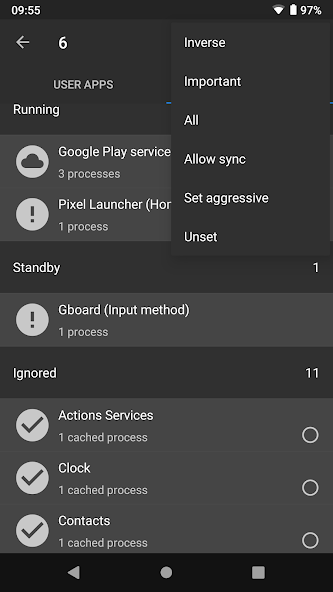
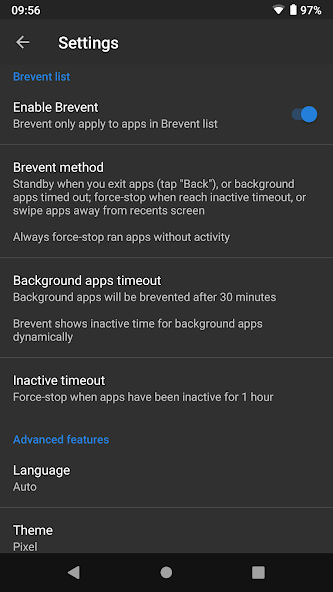
Brevent tools is a specialized Android utility designed to give users granular control over how applications behave in the background. At its core, Brevent addresses a common problem on modern mobile devices: some apps will restart, run services, or wake frequently even when a user intends them to remain idle, contributing to unnecessary battery drain, network activity, and distraction. The tool provides mechanisms to suspend or stop selected applications and to prevent them from relaunching automatically, offering a pragmatic middle ground between full uninstallation and passive tolerance. The project originated from the open source community and has evolved to support different deployment scenarios, including operation with root privileges or in a mode that leverages platform debugging interfaces. This flexibility lets users choose a setup that matches their technical skills and device constraints. Brevent’s approach is not to alter app code but to intervene at the system interaction layer: it monitors app lifecycle events and applies stop or block actions based on user-configured rules. Typical controls include per-app blocklists and safelists, temporary forced stops, and options to suppress background activity for categories of apps. While lightweight in its visible footprint, Brevent relies on higher-privilege system calls to execute its actions, so it requires a one-time permission setup to be effective. The tool’s UI is typically focused on clarity: showing active apps, recent restarts, and counters for prevented launches, which helps users understand the effects of their changes. In short, Brevent tools serve people who want to regain control over their device’s background behavior, reduce unintended resource usage, and tune the balance between app convenience and system performance without modifying apps themselves.
From a technical perspective, Brevent operates by interfacing with Android’s application management mechanisms to observe and influence app lifecycle transitions. It can watch for attempts by apps to start services, launch activities, or register receivers, and then apply policies that either permit or inhibit those actions. When running with elevated privileges, Brevent can issue commands akin to force-stopping an application, clearing pending intents, or blocking restart attempts in a manner that is reproducible and reversible. The tool typically maintains a local policy store where rules are recorded: these rules define which packages should always be kept from relaunching, which should be allowed to run freely, and which should be treated with conditional restrictions. Internally, it uses periodic scanning and event-driven hooks to detect triggers that would normally make an app active, and then enforces the configured policy. The design emphasizes minimal invasiveness: it avoids permanent modification of app packages, instead relying on system-level controls to achieve the desired state. Architecturally, Brevent usually breaks down into a background service that monitors system events, a controller component that decides on enforcement actions, and a user-facing interface for rule management and log review. Because Android versions and vendor customizations differ, Brevent implements adaptive strategies to work across platforms, falling back to different enforcement techniques depending on the available APIs and permissions. This modularity helps maintain functionality even as underlying Android behavior changes over time. Logs and usage metrics produced by the tool help users and power users refine rules, identify problematic apps, and quantify improvements in battery and memory usage stemming from applied restrictions.
From the user experience standpoint, Brevent is designed to be approachable for people who want hands-on management of background behavior without constant micromanagement. The interface typically presents a list of installed applications along with information about their recent background activity, restart attempts, and resource usage trends. Users can add items to a blocklist to prevent relaunches, place trusted apps on a safelist to exempt them from intervention, or apply temporary suspensions for troubleshooting and testing. Notifications and logs help illustrate when the tool intervenes, offering contextual information about which app attempted to restart and why the action was blocked. Common usability features include one-tap controls to toggle protection, batch operations to manage groups of apps, and historical summaries showing how many times relaunches were prevented. For those who prefer automation, policy presets and scheduled rules can reduce repetitive tasks by applying consistent behavior profiles during work hours, travel, or overnight. Brevent also keeps the visible interface uncluttered, focusing on actionable items rather than overwhelming telemetry. For advanced users, the tool exposes detailed logs and diagnostics that explain enforcement decisions, enabling fine-tuning of rules and fast identification of false positives. Because the tool directly affects app behavior, it provides clear feedback about the impact of changes — for instance, showing reductions in wake locks, network usage, or background CPU cycles after policies are applied. Overall, the user experience goal is to make control intuitive and transparent, helping people balance the convenience of background functionality with battery life and performance goals without needing to modify application code.
Privacy and security considerations play a central role in how Brevent is designed and discussed. The tool performs its work locally on the device and its primary interactions are with application lifecycle APIs and the system process manager. As a result, it does not require off-device processing for its core functionality, and it can be configured to keep logs and policy data on-device only. Nevertheless, because Brevent needs elevated permission to influence other applications, users should be aware that those privileges grant it considerable influence over installed packages; this is a necessary trade-off to achieve reliable background control. Safety-conscious operation includes careful rule configuration to avoid inadvertently blocking essential system services or critical app components. There are inherent limitations imposed by the platform: some system-level packages and privileged services cannot be stopped without root-level modifications, and manufacturer-specific power management schemes may override or reintroduce behaviors in ways that are hard to predict. Compatibility issues can also arise across Android releases as platform APIs evolve, meaning occasional tweaks or updates to the tool’s enforcement strategies are common. To mitigate risk, Brevent typically emphasizes reversible actions and visible logs so users can quickly detect and restore any service that was unintentionally suppressed. The architecture avoids persistent modifications to application packages and maintains a policy abstraction layer, simplifying rollback and audit. From a security viewpoint, because the tool manipulates app lifecycle behavior rather than altering app binaries, its attack surface is limited to the privilege it holds on the device. Responsible use focuses on purposeful restrictions, careful exemption of vital apps, and routine review of logs to verify that interventions align with the user’s intentions.
In practical terms, Brevent finds a home in several common use cases where control over background activity delivers clear benefits. Mobile power users who run many communication or media apps often use the tool to curb noisy or chatty packages that wake the device frequently for minor updates, reducing battery drain and interruptions. Privacy-minded users can restrict background network activity for apps that do not need continuous connectivity, helping to limit data usage. Developers and testers may use Brevent as a diagnostic aid to simulate force-stop conditions, observe app restart behavior, and ensure that their own applications handle lifecycle transitions gracefully. IT administrators and advanced home users sometimes integrate such control tools into device maintenance routines to stabilize performance on older hardware by minimizing unnecessary background processes. When implementing restrictions, best practices include starting with a short list of suspect apps, monitoring system behavior for unintended side effects, and incrementally expanding rules as confidence grows. Common troubleshooting steps when expected effects are not observed include reviewing enforcement logs to confirm blocked attempts, verifying that the policy store reflects the intended rules, and ensuring that essential system services remain exempt. Because behaviors can vary with platform updates, periodic reassessment of active rules helps keep the setup aligned with current system behavior. Overall, Brevent serves as a pragmatic, hands-on utility that empowers users to reclaim control over background application activity and to shape device behavior in pursuit of longer battery life, fewer interruptions, and smoother performance.
How to Get Started with Brevent?
- 1. Download Brevent from GitHub or the official website.
- 2. Install the application on your device.
- 3. Enable USB debugging in developer options.
- 4. Connect your device to a computer.
- 5. Open a command prompt or terminal window.
- 6. Navigate to the directory where Brevent is located.
- 7. Run the command `./brevent -s` to start the service.
- 8. Follow any on-screen prompts for setup.
- 9. Configure Brevent settings according to preferences.
- 10. Monitor app behavior and adjust settings as needed.
10 Pro Tips for Brevent Users
- 1. Regularly update Brevent to access new features and improved performance.
- 2. Familiarize yourself with the user interface to navigate settings efficiently.
- 3. Utilize the "Whitelist" feature to prevent certain apps from being suspended.
- 4. Monitor battery usage statistics to identify apps consuming excessive resources.
- 5. Use Brevent's scheduling options to automate app suspensions during specific times.
- 6. Explore in-app notifications to stay informed about app activities and updates.
- 7. Adjust settings for specific apps to customize their behavior according to your needs.
- 8. Clear cache and data periodically to improve overall app performance.
- 9. Back up your configuration settings before making significant changes.
- 10. Engage with the Brevent user community for tips and troubleshooting advice.
The Best Hidden Features in Brevent
- **Selective App Freezing**: Freeze specific apps to prevent them from running in the background and consuming resources.
- **Automatic Mode Switching**: Automatically switch between modes (e.g., normal, silent) based on user-defined rules or schedules.
- **Notifications Management**: Customize notifications for frozen apps, allowing for better control over which notifications to receive when apps are unfrozen.
- **Battery Optimization**: Enhance battery life by identifying apps that drain resources and freezing them when not in use.
- **App Management Interface**: Intuitive interface to easily manage the status of apps, including freezing or unfreezing with one tap.
- **Log History**: Track app usage history and performance metrics to identify problematic apps over time.


 HappyMod