Home  ›  Games  ›  Strategy  ›  Plants vs. Zombies™ 3: Evolved Mod APK
Plants vs. Zombies™ 3: Evolved icon

Plants vs. Zombies™ 3: Evolved MOD APK v26.3.6 [Infinite] [Mod Menu]

Plants vs. Zombies™ 3: Evolved Mod APK - Plants vs. Zombies™ 3: Evolved is a tower defense game that updates classic PvZ lanes with merge and mutate combat and story driven progression..

App Name Plants vs. Zombies™ 3: Evolved
Publisher Electronic Arts
Genre
Size 205.67 MB
Latest Version 26.3.6
MOD Info Infinite/Mod Menu
Get it On
MOD1 Info
mod menu:
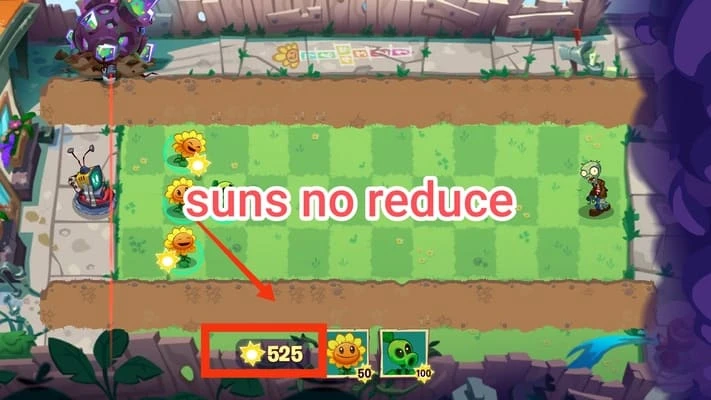
Infinite Sunlight
MOD2 Info
MOD: Unlimited Suns
MOD3 Info
Unlimited Suns
MOD4 Info
MOD, Unlimited Suns
MOD5 Info
Unlimited suns
Download (205.67 MB)
  • Plants vs. Zombies™ 3: Evolved screenshots
  • Plants vs. Zombies™ 3: Evolved screenshots
  • Plants vs. Zombies™ 3: Evolved screenshots
  • Plants vs. Zombies™ 3: Evolved screenshots
  • Plants vs. Zombies™ 3: Evolved screenshots
Explore This Article

About Plants vs. Zombies™ 3: Evolved

Plants vs. Zombies 3: Evolved brings familiar plant versus zombie battles into a modern format with quick decisions and flexible tactics. You grow a roster of plants, manage resources, and adapt inside each encounter to move the adventure forward. The Seedling Build focuses on testing new systems and live events while you explore chapters, meet characters, and aim to outsmart Dr. Zomboss through a mix of strategy and humor. Download Plants vs. Zombies 3: Evolved now and defend your garden against Dr.Zomboss and his zombie army!

Key features

Merge and mutate plants

Plants vs. Zombies 3: Evolved introduces a merge and mutate system that lets you combine units during combat to create direct counters. This adds reactive depth so you can pivot when new zombie variants enter the lane.

Classic lanes with fast decisions

The core remains lane-based defense, and it now encourages mid-battle merges and quick placements across more than two hundred stages. Therefore, you adjust your plan on the fly as boards escalate and combo plays open up.

Story adventures with new biomes

Plants vs. Zombies 3: Evolved uses a comic-inspired presentation to guide you through chapters, biomes, and variants. Moreover, the tone keeps the signature PvZ humor while introducing fresh enemies and level goals.

Customization and community spaces

You personalize your avatar and decorate a home area that grows as you progress. In addition, community spaces and timed events offer shared targets and collaborative rewards that keep you returning.

Seasonal progression and rewards

Plants vs. Zombies 3: Evolved includes a seasonal Battle Pass that grants cosmetics, vanity items, and ongoing unlocks. As seasons rotate, you follow a clear path for earning themed rewards through regular play.

Active Seedling Build

The Seedling Build is an evolving early access phase that expands over time. So you can play now, share feedback, and see systems adjust as the team refines content and balance.


About the Seedling Build of Plants vs. Zombies 3: Evolved

The Seedling Build is a limited early access snapshot designed to gather data and feedback. Availability can be restricted by region or wave, and registration may not guarantee immediate access. Progress and purchases made during this phase will not carry over to the eventual main release.

A persistent internet connection is required to log in and play the Seedling Build. Therefore, you should expect frequent updates, data resets, and feature changes as content rolls out.


Availability for Plants vs. Zombies 3: Evolved

Plants vs. Zombies 3: Evolved targets mobile platforms, and APKPure provides the Android package for convenient access. Region rollout is gradual, so some areas may see the game later than others, and the schedule can change as testing scales up.

The Seedling Build launched on October 7. We will update this page as new regions are added and as the Plants vs. Zombies 3: Evolved APK latest version becomes available.


Events and live service cadence in Plants vs. Zombies 3: Evolved

Seasonal events and the Battle Pass structure set expectations for ongoing content. You can plan around limited-time objectives, community goals, and cosmetic unlocks that refresh at regular intervals. This keeps your roster engaged beyond core chapters.


How to play Plants vs. Zombies 3: Evolved

This guide outlines the basics of Plants vs. Zombies 3: Evolved so you can start quickly. It focuses on roster building, lane control, and how merges change the flow of fights.

  1. Begin by playing the tutorial chapters to learn sun generation, lane coverage, and timing. Place core defenders first, then add support plants to stabilize each lane.

  2. As zombies approach, watch for merge prompts and available seedlings. Combine compatible plants to strengthen counters when new threats or variants appear.

  3. After you stabilize two or more lanes, shift attention to high-pressure paths and use merges to spike damage or utility. Save key abilities for boss waves.

  4. Expand your plant roster between stages by completing objectives and claiming chapter rewards. Upgrade priority units that consistently fit your strategy.

  5. Then customize your avatar and home, visit community spaces, and join seasonal events. Follow the Battle Pass tasks to earn cosmetics while you progress through chapters.


Download and start defending

Plants vs. Zombies 3: Evolved blends classic lanes with flexible merges and a story-led structure that rewards quick thinking. Download Plants vs. Zombies 3: Evolved APK latest version on APKPure to start building your roster and testing strategies today.


FAQs

Which countries is Plants vs. Zombies 3: Evolved available in?

Availability is limited during the Seedling Build and expands gradually by region. If the game is not yet accessible in your area, check this APKPure page regularly for Plants vs. Zombies 3: Evolved APK latest updates and watch in-game notices for rollout news.

What is the Seedling Build, and will my progress carry over?

The Seedling Build is an early access phase focused on testing new systems, content, and balance. Progress and items from the Seedling Build will not carry over to the main release of Plants vs. Zombies 3: Evolved.

Do I need an internet connection to play?

Yes, a persistent internet connection is required to access, authenticate, and play the Seedling Build of Plants vs. Zombies 3: Evolved. Plan to stay online during sessions and updates.

Does Plants vs. Zombies 3: Evolved have DLC?

Plants vs. Zombies 3: Evolved does not use traditional DLC packs during the Seedling Build. Instead, seasonal Battle Pass tracks and live events deliver new cosmetics, goals, and rewards over time.

Plants vs. Zombies™ 3: Evolved Faqs

What about the Plants vs. Zombies™ 3: Evolved Mod ?

Plants vs. Zombies™ 3: Evolved is a Arcade Games Developed by Skyloft. This mod is upload by HappyMod App Users. The Mod Feature about This Mod is: 1. UNLIMITED GOLD
2. UNLIMITED UPGRADES.

How can I download the Plants vs. Zombies™ 3: Evolved Mod?

You need to click the download button to Downloading Page, then you will download Plants vs. Zombies™ 3: Evolved directly. If you have downloaded HappyMod App, it is ok. You need to install HappyMod App then click the download button on downloading page. The app you want to download will show on HappyMod App.

How about the download speed?

The download speed in HappyModpro is really fast. The Download speed in HappyMod App is faster. You can download HappyMod App first in home page.

Is Plants vs. Zombies™ 3: Evolved Mod safe?

Plants vs. Zombies™ 3: Evolved Mod is 100% safe. This mod was upload by users. It has been tested and overviewed by editor. Then we will use all types of an-ti virus software to scan the file. You do not to worry about the safety of Plants vs. Zombies™ 3: Evolved Mod.

Why cannot install the Plants vs. Zombies™ 3: Evolved mod?

First, you should uninstall the original version Plants vs. Zombies™ 3: Evolved App, the signature will conflict with mod version. Then you should allow unknow resource can be install on your Android devices.

Games like Plants vs. Zombies™ 3: Evolved Mod APK

Rate this Mod

(0)

Leave a Comment

X