What is MacroDroid - Device Automation Apps?
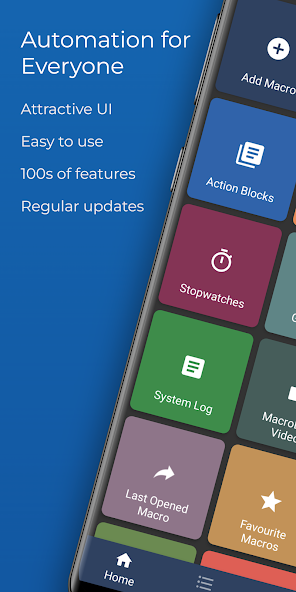
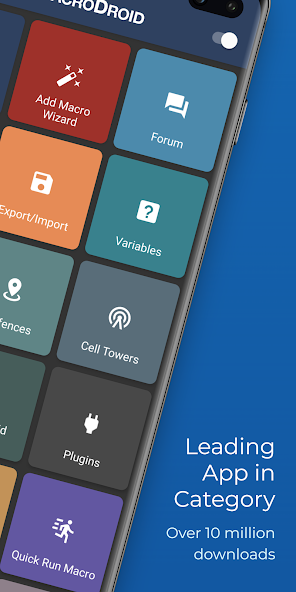
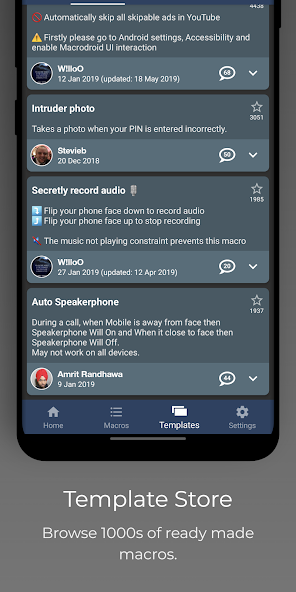
MacroDroid is a flexible automation application for Android devices that enables users to create automated tasks and workflows using triggers, actions, and constraints. The core concept involves selecting a trigger—such as a change in device state, an incoming message, a location transition, or a scheduled time—and then defining one or more actions that the application should perform when the trigger occurs. Actions can range from toggling system services like Wi-Fi or Bluetooth, adjusting display settings, sending messages, launching apps, controlling media playback, taking photos, modifying volume levels, or interfacing with hardware sensors. Constraints are optional conditions that must be satisfied for an automation to run; for example, a macro can be restricted to operate only when the device is connected to a particular network, during certain hours, or when the battery level is above a threshold. Macros can be chained or nested to form complex sequences, and variables—both built-in and user-defined—allow dynamic behavior and parameter passing between steps. The interface emphasizes a visual, modular design that simplifies macro creation for users with varying technical backgrounds. Templates and prebuilt macro examples provide quick starting points, while an advanced editor exposes conditional logic, loops, and delays for power users who want fine-grained control. Integration with system APIs and third-party services through intents, broadcast receivers, HTTP requests, and plugin support expands possibilities dramatically. Scripting capabilities and support for external inputs, such as NFC tags, sensors, or wearable device events, allow MacroDroid to act as a central hub for context-aware automation across accessories and peripherals. Logging and execution histories help with debugging and optimization, displaying what triggered an action and the result of execution steps. Overall, MacroDroid is designed to reduce repetitive tasks, save time, and tailor device behavior to personal routines and preferences. It supports community-shared templates and extensible plugin frameworks for customization.
MacroDroid excels in everyday practical use cases by automating routine interactions and reacting to contextual signals to streamline daily life. For commuters, macros can automatically silence calls during driving, switch to navigation modes when a specific Bluetooth connection activates, and launch commuting playlists or podcasts. At home, routines can be created to toggle smart lights, adjust thermostat settings via compatible devices, and switch the phone to a do-not-disturb profile at bedtime. Power users deploy macros for battery management by turning off radios when battery thresholds are reached, dimming screen brightness at night, or pausing synchronization during low-power states. Photographers and content creators use camera triggers to capture images at predefined intervals, control flash behavior, or upload media to cloud services through HTTP integrations when connected to particular Wi-Fi networks. Travelers benefit from location-aware automations that change wallpaper, modify notification priorities, or adapt network connections when entering different countries. MacroDroid also supports safety and accessibility workflows: emergency macros can automatically broadcast an alert message, toggle GPS tracking, or start continuous audio recording when a panic trigger is pressed. For families, parental or usage controls manage app access windows, restrict background data, and log device activity patterns. Developers and integrators create chained macros to implement sophisticated sequences, like scanning an NFC tag to authenticate entry, then unlocking a door via smart home APIs, turning on lights, and notifying household members. Business users implement automations to log time, switch profiles for meetings, mute notifications during presentations, or perform scheduled backups of critical data. Integration with wearable devices and Bluetooth peripherals means macros can respond to sensor readings, button presses, or health metrics. The combination of triggers, variables, and conditional checks makes MacroDroid adaptable to many scenarios, reducing manual interaction with a device and allowing users to focus on more meaningful tasks and productivity.
Under the hood, MacroDroid relies on a modular trigger-action-constraint architecture that balances simplicity and extensibility. Triggers table device and environmental events that include system broadcasts, sensor state changes, connectivity events, application launches, battery statistics, hardware button presses, and custom intents. Actions are implemented as discrete modules that call into system services or invoke higher-level operations: toggling radios, modifying system settings via allowed APIs, interacting with files, sending intents to other applications, issuing HTTP requests, or controlling audio and media handlers. Constraints act as guards that evaluate contextual predicates—such as time windows, screen states, charging conditions, or specific network connections—before permitting execution. The macro runtime engine interprets macro definitions, maintains variable scopes, schedules delayed tasks, and orchestrates concurrent macro execution while avoiding resource conflicts through locking or queuing mechanisms. Variable management supports global and local scopes, string and numeric types, lists, and timestamp functions, enabling dynamic substitution and calculated logic inside actions. Users can persist data between runs, seed macros with inputs from external sensors, or parse incoming events to extract meaningful fields. Advanced functionality is supported by plugin interfaces and intent-based integration points, allowing third-party components to expose custom triggers and actions. For HTTP integrations, MacroDroid handles request composition, authentication headers, payload encoding, and parsing responses so that macros can interact with web services or home automation hubs. Error handling and retry policies let macros cope with transient network failures; conditional branches and exception-like blocks allow alternative flows. Performance considerations include efficient event filtering to reduce wakeups, batching of rapid events, and respecting system power management policies. Logging layers capture execution traces and variable values, with timestamped records aiding troubleshooting. Extensibility through scripting snippets or external command execution provides a path for customized logic, while template sharing and import/export formats make it straightforward to transfer complex macro sets between devices.
MacroDroid operates within the permission and security model of the Android platform, which shapes what automations can and cannot accomplish. To perform actions that affect system settings, access sensors, or read messages, individual macros request the appropriate runtime permissions that the operating system mediates. The permission model reduces the attack surface by isolating privileged operations and requiring explicit user consent, and MacroDroid adds an additional layer of visibility by listing which macros require certain capabilities. It is prudent to design macros with the principle of least privilege: request only the permissions necessary for a given workflow and use constraints to limit activation contexts. For operations that interact with third-party services or web endpoints, macros typically use configurable HTTP actions; users should encode tokens securely in variables and take care when storing sensitive credentials in persistent fields. Macros that automate network communications can implement retry strategies and response verification to avoid accidental data exposure due to unintended triggers. Long-running or resource-intensive macros should include guardrails such as maximum runtime constraints, rate limits between repeated actions, and battery-condition checks to prevent excessive drain. When using external hardware interfaces—Bluetooth peripherals, NFC tags, or wearables—macros can validate device identifiers and include fallback branches if expected responses are not received. Logging and execution histories provide transparency but may record sensitive metadata; configure retention policies and redact or limit logs that contain personal information. Security-minded users often separate automation responsibilities by using distinct variables and namespacing to avoid accidental collisions between macros. Testing new macros in controlled scenarios, simulating triggers, and using dry-run styles of logic help surface unintended consequences before full deployment. While the platform enables powerful automation, mindful design choices—minimal privilege, explicit constraints, secure storage of secrets, and conservative logging—help maintain privacy, preserve battery life, and reduce the risk of erroneous or harmful behavior.
MacroDroid occupies a distinctive position among mobile automation tools by combining a beginner-friendly visual flow with depth for advanced customizations. Compared to rule-based automation utilities that emphasize scripting, MacroDroid focuses on modular building blocks—triggers, actions, and constraints—that can be composed without deep programming knowledge, while still exposing advanced constructs like variables, conditional branches, and HTTP integrations for power users. Its approach makes it accessible to non-developers who want to automate everyday tasks, yet robust enough for technical users who integrate device automation into broader workflows involving home automation hubs, cloud services, or developer tools. The product ecosystem often includes community contributions: shared macro templates, example workflows, and documented patterns that illustrate how to combine disparate capabilities into coherent automations. From a practical standpoint, users benefit from balancing simplicity and control. Free tiers typically allow a limited number of macros or features, while paid options unlock higher macro counts, plugin support, or additional concurrency. Many adopters curate a personal library of templates for common activities—commuting, sleep routines, device maintenance—and iterate on them to suit individual preferences. Community forums and documentation cover troubleshooting, creative use cases, and optimization patterns, and template exchange formats make it straightforward to import complex sequences. For developers, extensibility points such as intent-based hooks, plugin frameworks, and HTTP integrations provide paths to incorporate MacroDroid into bespoke solutions or enterprise scenarios. Looking forward, trends that could influence device automation include tighter integration with edge AI for predictive automations, richer cross-device coordination, and standardized interfaces for smart home and IoT ecosystems. Users who approach automation as a gradual, test-driven practice tend to achieve the most reliable outcomes: start with simple tasks, monitor behavior, iterate, and progressively add complexity. In all cases, a principled approach to permission use, logging, and constraint design helps maintain a predictable and secure automation environment today.


 HappyMod