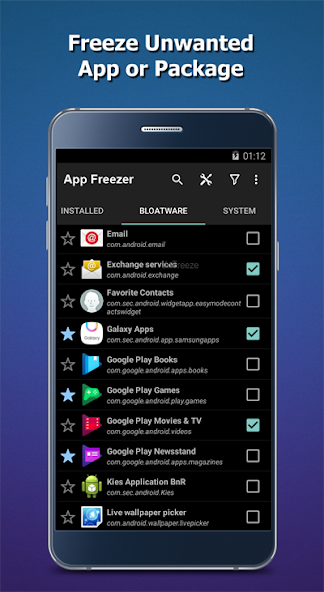
App Freezer Mod APK - Freeze unwanted app or package on Android (Samsung, Sony, Xiaomi, Huawei, etc).
| App Name | App Freezer |
|---|---|
| Publisher | Mobizsystems |
| Genre | App |
| Size | 7.95 MB |
| Latest Version | 2.0.5 |
| MOD Info | Remove ads/Unlocked/Premium |
| Get it On |
App Freezer is designed for users who want fewer background tasks and smoother everyday performance. When apps or preinstalled bloatware keep running, the phone can feel slow and the battery drains faster. This tool pauses those apps safely so they stop using RAM and power, which can ease lag during normal use. It also helps reduce distractions from persistent services, and you can bring apps back whenever needed. For quick access, many users prefer installing the App Freezer APK to manage this behavior directly.
Freeze and unfreeze apps
App Freezer lets you disable unwanted apps and packages so they no longer run in the background. You choose what to freeze, including preinstalled bloatware that you do not use. When it is time to use an app again, unfreeze it to restore normal behavior without reinstalling.
One-tap process control
The Freeze One and Freeze All actions give you quick control with minimal taps. This is helpful when you want to stop a single noisy app or silence everything before a busy day. After that, you can review what is frozen and decide what to keep paused.
Defrost for instant recovery
Defrost reverses any freeze immediately so the app works as before. This makes testing easy because you can switch apps back on without restarting the phone. It also saves time if a frozen app needs access for an urgent task.
Rooted and non-root support
App Freezer works on rooted phones and on non-root devices through Device Administrator mode. This gives broader compatibility for users who prefer not to root. With the right permission, background processes can be restricted reliably across different models.
Widgets, fingerprint lock, and organized lists
You can add home-screen widgets to freeze or unfreeze faster, then secure access with fingerprint authentication. Favorites and smart filters help you find frequent targets quickly. For backup or sharing, export and import frozen lists in XML, which makes setup easier when switching devices.
App Freezer Android uses Device Administrator permission (BIND_DEVICE_ADMIN) to control background behavior. It does not delete app data and only changes the running state so you can revert at any time. WRITE_EXTERNAL_STORAGE is used for exporting and importing XML lists and related settings. On non-root devices, enable Device Administrator when prompted, and advanced users may use ADB to grant required permissions for consistent control.
Unfreeze all apps before installing any over-the-air system update to avoid conflicts. Do not freeze system-critical packages such as the phone dialer, messaging, launcher, or essential services, since this can affect normal operation. If you plan to remove App Freezer later, first disable Device Administrator in system settings, then uninstall to prevent errors. These steps help keep daily use stable and predictable.
Behavior may vary by device and manufacturer. Some Xiaomi phones running MIUI can limit or block freezing actions, which may reduce effectiveness. If you notice restrictions, check your device settings for background control rules and security policies. For additional setup tips, review the official website resources linked below.
After you download App Freezer, setup is straightforward and takes only a moment. Start by granting the required permissions so the app can manage background activity. Then follow these steps to begin controlling unwanted apps.
App Freezer provides direct control over background apps with simple freeze and defrost actions. It supports rooted and non-root setups so most users can manage bloatware and persistent processes. To use the App Freezer latest version, follow the download link on this page.
For support and setup resources, see the official links below.
App Freezer is a Arcade Games Developed by Skyloft. This mod is upload by HappyMod App Users. The Mod Feature about This Mod is: 1. UNLIMITED GOLD
2. UNLIMITED UPGRADES.
You need to click the download button to Downloading Page, then you will download App Freezer directly. If you have downloaded HappyMod App, it is ok. You need to install HappyMod App then click the download button on downloading page. The app you want to download will show on HappyMod App.
The download speed in HappyModpro is really fast. The Download speed in HappyMod App is faster. You can download HappyMod App first in home page.
App Freezer Mod is 100% safe. This mod was upload by users. It has been tested and overviewed by editor. Then we will use all types of an-ti virus software to scan the file. You do not to worry about the safety of App Freezer Mod.
First, you should uninstall the original version App Freezer App, the signature will conflict with mod version. Then you should allow unknow resource can be install on your Android devices.
Best mod downloader
for 100% working mods.
 HappyMod